
Gift wrap, engraving and paid extras on your EasyStore products.
Add fields to your product pages: a checkbox for gift wrap, a dropdown for a box size, a text field for engraving. Each priced choice is charged as its own line in EasyStore's cart, so tax, coupons, checkout and payment work as they always do. It never edits EasyStore or your template, so updates do not remove it.
- Free edition
- Pro for more field types and prices
- No template overrides
On this page
What it does for you
Fields on the product page
Checkbox, dropdown, radio and short text fields appear above EasyStore's own Add to cart button, with a live total of what the choices add.
Charged by EasyStore
Each priced choice is its own line in the cart, so EasyStore's tax, coupons, checkout and payment handle it like any product.
Checked on the server
Prices come from your settings, never from the browser. A product with a required add-on is never added, or ordered, without it.
Choices everywhere they matter
The cart drawer, checkout and the order emails list each choice under its product, and the choices are saved with the order.
Built for updates
No template overrides and no edits to EasyStore's files, so a template or EasyStore update does not remove it.
More with Pro
Long text, number and date fields, prices by percentage, per character or per unit, groups for whole categories, and any number of fields.
Screenshots
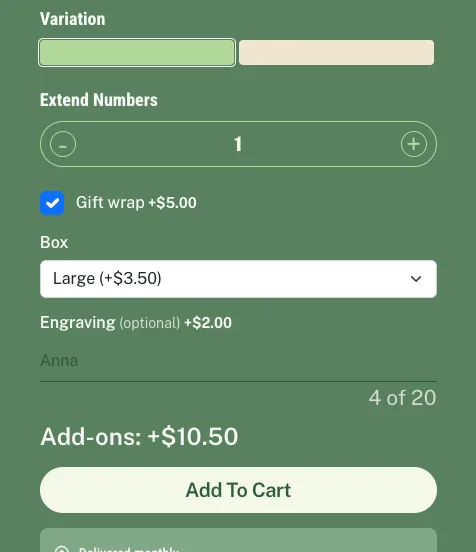
On the product page: a gift-wrap checkbox, a box-size dropdown and an engraving field, with the live add-on total. The fields take the colours of the page.
Set it up in three steps
- 1
Install the Free package
Upload the package in System, Install, Extensions. The plugin is switched on for you.
- 2
Add a group of fields
Open the plugin settings, add a group, pick its products and add its fields: label, type, price and whether it is required.
- 3
Add Pro when you want more
Install the Pro package on top and enter your license key to unlock more field types, prices and assignments.
Installation, the license and every setting are in the documentation
Free and Pro
Free
Checkbox, dropdown, radio and short text fields with fixed prices, required fields, groups for the products you pick, and up to 3 fields per product. No license key needed.
Pro
Adds long text, number and date fields, prices as a percentage of the product, per character or per unit, groups for whole categories or every product, any number of fields, and updates with your license key.
Everything it does
The highlights by part. The documentation covers each setting.
Product page
Groups of fields
A group has a name, the products it shows on, and its fields in order. Several groups can show on one product.
Four field types
Checkbox, dropdown, radio buttons and short text, each with a label, an optional help line and placeholder.
Required fields
A required field left empty, a text too long or a wrong choice stops the add and says what to fix next to the field.
Live add-on total
Shows what the choices add before the buyer presses Add to cart, in the shop's own currency format.
Looks like your shop
The fields use the template's own form style and the colours of the labels around them.
Cart, checkout and order
Its own cart line
Each priced choice is a line in EasyStore's cart, so tax, coupons, checkout, invoice and payment treat it like any product.
Follows the product
An add-on line's quantity matches the product's, it has no quantity buttons of its own, and it leaves the cart with the product.
Choices listed
The cart drawer, checkout and the order confirmation emails list each choice under its product, for example
Engraving: Anna.Checked on the server
Every choice is checked again when it reaches the cart, and a product with a required add-on cannot be ordered without it.
Pro
More field typesPro
Long text, number (with a lowest and highest value) and date.
More ways to pricePro
A percentage of the product's price, per character typed (spaces are free), or per unit entered.
Groups for categories or every productPro
Give a group to whole categories, or to every product in the shop.
Any number of fieldsPro
Free shows the first 3 fields of a product; Pro shows them all.
Built to last
No overrides, no edits
Its own plugin, media folder, tables and settings. Nothing in the template or in EasyStore's files is changed.
Settings are kept
If a Pro license ends, the Free limits apply and every field and group you saved stays saved.
License and updatesPro
Activate your key in the Pro plugin, verify it with one click, and see whether a newer version is available.
Settings, examples and walkthroughs for every feature are in the documentation
What's new
Version 1.0.0 · 27 October 2026
- Add-on fields on product pages — Checkbox, dropdown, radio and short text fields above EasyStore's own Add to cart button, set up in groups.
- Prices through EasyStore's own cart — Each priced choice is charged as its own cart line, with EasyStore's tax, coupons and payment.
- Choices in the drawer, checkout and emails — Each choice is listed under its product and saved with the order.
- Required fields checked on the server — A product with required add-ons cannot be added or ordered without them.
- Pro: more fields, prices and assignments — Long text, number and date fields, percentage, per-character and per-unit prices, groups for categories or every product, and any number of fields.
Requirements
- Joomla 4.4, 5 or 6
- PHP 8.1 or later
- EasyStore 3.x installed
- Pro: the free add-on, and a license key
- GPL v2 or later
Frequently asked questions
Sell the extras your customers already ask for
Gift wrap, engraving, a bigger box or a message card, priced and charged through EasyStore's own cart. Nothing in your template or EasyStore is touched.