
MuRu Product Add-Ons 1.0.0 Released: Gift Wrap, Engraving, Paid Options for EasyStore and More

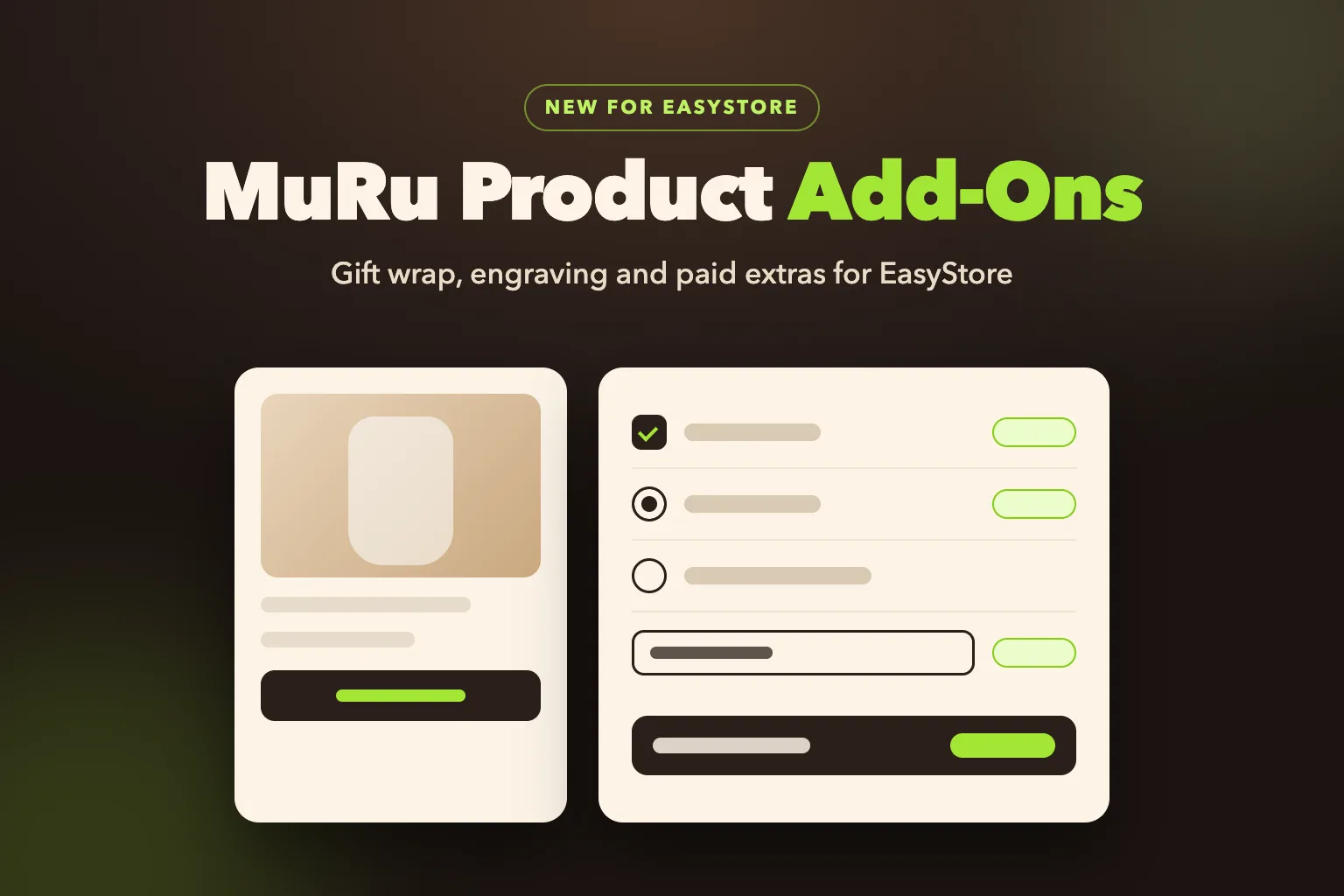
MuRu Product Add-Ons lets an EasyStore shop sell the extras customers ask for with a product: gift wrap, a bigger box, an engraved name, a message card. You add fields to your product pages, the buyer fills them in, and each priced choice is charged as its own line in EasyStore's cart. EasyStore's own tax, coupons, checkout and payment handle the money, and nothing in your template or EasyStore is edited.
Quick answer
Install the free package, open the plugin settings, add a group, pick its products and add its fields with their prices. Open one of those products in your shop: the fields are above the Add to cart button. Add Pro later for more field types, more ways to price and category-wide groups.
Independent product
EasyStore is made by JoomShaper. MuRu Product Add-Ons is made by Lyzerslab and is not made, sold, supported or endorsed by JoomShaper.
- Why product add-ons
- On the product page
- Charged through EasyStore's own cart
- Checked on the server
- At checkout and on the order
- What Pro adds
- Built so updates do not remove it
- Good to know
- Get started
- Frequently asked questions
Why Product Add-ons
EasyStore has variants: a colour or a size, each with its own stock and price. That is the right tool when every combination is a different item on the shelf. It is the wrong tool for "add gift wrap", "engrave this name" or "put it in the large box": those are choices on top of the product, often typed by the buyer, and they should not multiply your variants. WooCommerce shops solve this with a product add-ons extension. MuRu Product Add-Ons brings the same idea to EasyStore.
On the Product Page
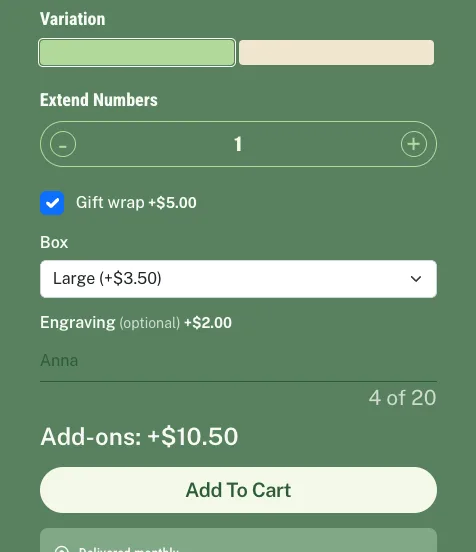
You set up groups of fields in the plugin settings and give each group to the products it belongs to. The free edition has four field types: a checkbox (yes or no), a dropdown, radio buttons and short text. Each field has a label, an optional help line and placeholder, a price, and can be required. Short text has a length limit and a live character counter.
The fields appear above EasyStore's own Add to cart button, in the template's own form style and the colours of the labels around them. A line under them shows what the choices add, so the buyer sees the extra cost before pressing the button.
Charged Through EasyStore's Own Cart
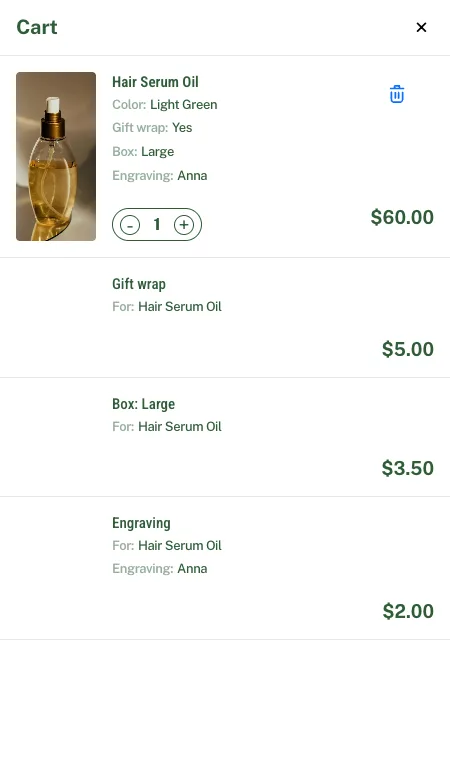
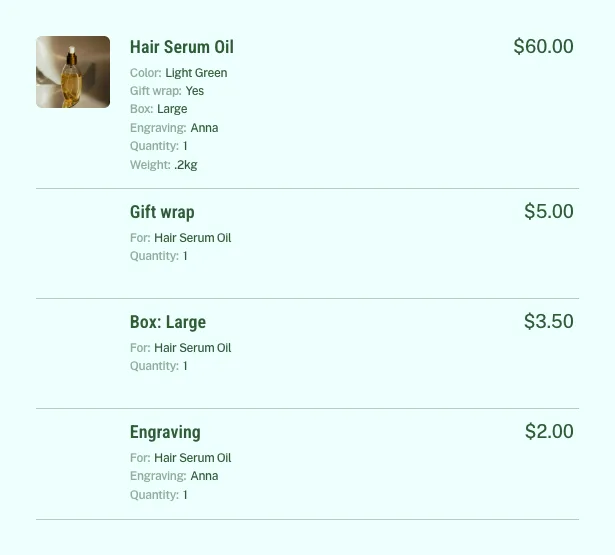
This is the part that matters most for a shop owner. Each priced choice is added to the cart as its own line: "Gift wrap", "Box: Large", "Engraving". Because they are real cart lines, EasyStore does everything it does for any product: it adds tax, applies coupons, and puts them on the order, the invoice and the payment. The add-on never changes a product's price or a cart total behind EasyStore's back.
Follows the product
An add-on line's quantity always matches the product's. It has no quantity buttons of its own, and it leaves the cart with the product.
Choices under the product
The product's line lists what was chosen, and each add-on line says which product it is for.
Checked on the Server
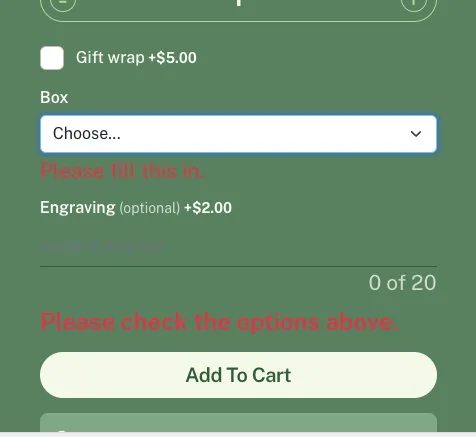
The page helps the buyer: a required field left empty or a text that is too long stops the add and says what to fix, right next to the field. But the page is never trusted. Every choice is checked again on the server when it reaches the cart, the prices come from your settings and never from the browser, and a product with a required add-on cannot be added to the cart, or ordered, without it.
At Checkout and on the Order
EasyStore's checkout summary lists the choices and the add-on lines, and its totals include them. When the order is placed, the choices are saved with it, and both order confirmation emails, the buyer's and the shop's, list them under the product.
What Pro Adds
Pro is a separate add-on that installs on top of the free one and switches on once you enter your license key.
More field types
Long text for a gift message, a number with a lowest and highest value, and a date.
More ways to price
A percentage of the product's price, a price per character typed (spaces are free), or a price per unit entered.
Wider groups
Give a group to whole categories or to every product, and show any number of fields per product (Free shows 3).
If a Pro license ends, the free limits apply again and your shop keeps working. Every field and group you saved stays saved and comes back when the license is active again.
Built So Updates Do Not Remove It
It is its own plugin with its own files, tables and settings. It adds no template overrides and never edits EasyStore's files, so an update of either does not replace or remove it. If an EasyStore update ever changes the product page in a way the add-on does not recognise, the fields hide themselves and a product with required add-ons is refused with a message, so nothing is sold without its choices.
Good to Know
- EasyStore keeps one cart line per product and variant, so a product carries one set of choices in a cart. Adding it again with other choices replaces them.
- The quick-add window on product lists has no fields. A product with required add-ons asks the buyer to open its product page.
- For a product with variants, EasyStore's own order page and invoice show the variant name on the product's line; the priced choices are still listed on their own add-on lines.
Get Started
Quick reference
- Download the free package from your Lyzerslab dashboard and install it in Joomla (System, Install, Extensions).
- Open System, Plugins, System - MuRu Product Add-Ons for EasyStore.
- Add a group: give it a name, pick its products, and add its fields with a label, type, price and whether it is required.
- Save, and open one of those products in your shop.
- Want Pro? Install the Pro package on top, then paste your key in its License box and press Activate.
Frequently Asked Questions
Will the hidden add-on products show in my shop?
No. They are unpublished, so the shop never lists them and their page cannot be opened. You will see them in EasyStore's product list in the administrator, marked unpublished. Leave them there: past orders show their lines.
Can a buyer skip a required add-on?
No. It is checked on the server when the product reaches the cart and again at checkout.
Will a template or EasyStore update remove it?
No. It is its own plugin and never edits the template or EasyStore's files.
Do I need Pro?
No. The free add-on covers checkbox, dropdown, radio and text fields with fixed prices. Pro is for long text, numbers and dates, percentage, per-character and per-unit prices, and category-wide groups.
What does it cost?
The free edition costs nothing and needs a Lyzerslab account to download. Pro prices are on the pricing page.
MuRu Product Add-Ons turns the extras your customers already ask for into something they can choose and pay for on the product page, with EasyStore doing the money. Try it on a staging copy first, set up one group on one product, and place a test order.
MuRu Product Add-Ons
Gift wrap, engraving and paid options on EasyStore product pages, charged through EasyStore's own cart. Free, with Pro for more fields and prices.
Comments (0)
No comments yet. Be the first to comment!